Portfolio Site for Fashion Stylist: Astro + Sanity CMS on Cloudflare
This project is a real-life, high-performing site I built for a Fashion Stylist. For saradm.com, I leveraged the ease of use of Sanity.io headless CMS with the flexibility of Astro as a Frontend to deliver a great user experience for the visitor, the stylist making the content, and for myself maintaining the site. I deployed the site on Cloudflare Pages, utilizing serverless functions for the contact form which I built in TypeScript and integrated with Resend’s RESTful API.
Technical Stack
- Frontend Framework: Astro
- UI Library: React (for interactive components)
- Styling: Tailwind CSS
- Headless CMS: Sanity.io
- Deployment & Hosting: Cloudflare Pages
- Email Service: Resend
Architectural Highlights & Key Features
I architected this project with the main goal of enabling the end-user (the stylist) to admin the contents, while keeping the site fast, maintainable, and scalable from a development perspective. To achieve this, I used a blend of static site generation and serverless computing.
1. Hybrid Architecture with Astro
I built the frontend core of the site with Astro, which I chose for its excellent performance and wide compatibility for different sources. I configured the architecture for server-side rendering to support dynamic API routes while pre-rendering static pages for optimal load times. This hybrid approach provided the best of both worlds: the speed of static sites for content and the flexibility of server-rendered applications for user-interactable pages. Every post gets generated at build time from a queries to the sanity.io CMS.
The site has two types of pages:
- Static Pages: Astro statically generates most pages (
index,posts,[slug]) at build time, ensuring near-instant delivery from Cloudflare’s edge network around the world. - Dynamic API Routes: I wrote a serverless API endpoint (
/api/contact.ts) to handle form submissions without requiring a traditional backend server.
2. Headless CMS for Content Management
I used Sanity.io to manage all project content, including text and images. This decouples the content from the presentation layer, allowing the stylist to update their portfolio without needing my intervention, following the JAMstack philosophy. Astro fetches this content at build time to generate the static pages.
Hosting all the images in Sanity.io allows me to use Sanity’s CDN to serve images at the right size and anywhere in the world.
3. Serverless Contact Form
To handle user inquiries, I implemented a secure and robust contact form:
-
Frontend: I used a React component (
ContactForm.jsx) to provide a modern, interactive user experience with client-side validation. The component manages form state, handles user input, and communicates with the backend API. -
Backend: I wrote an Astro API route that acts as a serverless function deployed on Cloudflare. It receives the form data, validates it, and uses the Resend API to send the email.
-
Security: I managed API keys and environment variables securely using Cloudflare’s environment variable system, accessing them via
locals.runtime.envin the Astro backend to prevent exposure on the client-side.
4. Deployment Pipeline & Infrastructure
I architected the deployment pipeline to minimize operational overhead while maintaining reliability, prioritizing managed services over self-hosted complexity.
GitOps Workflow: The repository connects directly to Cloudflare Pages, which handles build orchestration automatically. Sanity webhooks trigger redeploys on content changes, creating a seamless publishing flow: the stylist publishes in Sanity, and the site rebuilds and propagates globally within seconds.
DNS & SSL: The domain runs on Cloudflare nameservers, enabling instant SSL certificate provisioning and edge caching configuration without additional tooling.
Observability: Build failures trigger email alerts. While I initially explored PagerDuty for alerting, its free tier limitations led me to implement a lightweight notification system that covers the single point of failure: deployment pipeline.
The Tradeoff: This isn’t “zero DevOps”. It is “right-sized DevOps.” I manage DNS, SSL termination, edge caching rules, and build monitoring rather than building and maintaining an expensive elastic infrastructure like Kubernetes clusters. For a single-client portfolio site, this implementation provides enterprise-grade reliability (99.9% uptime) with minimal to no ongoing maintenance and minimal to no cost.
5. Responsive Design & Image Optimization
With users being all around the world and interested in fashion, a major focus for me was creating a visually consistent and responsive experience across all devices.
- Tailwind CSS: I used a utility-first approach for rapid, maintainable styling. I configured custom styles to keep a specific color palette across the whole site in
tailwind.config.js. - Responsive Image Loading: I used the Astro
Imagecomponent to implementsrcsetandsizesattributes. This ensures that browsers download the most appropriately sized image based on the device’s viewport and resolution, significantly improving performance and reducing bandwidth. - Dynamic Layouts: I designed the project gallery with layouts that dynamically adjust based on content, such as aligning text based on the position of the corresponding image and different columns for big screens or mobile.
Development Process & Problem-Solving
My development process was iterative, focusing on building features, fixing bugs, and continuous refinement with immediate feedback from the Stylist.
-
Build & Rendering: Early in development, I migrated the project from a purely static output to a server-rendered output (
output: 'server') to accommodate the serverless API route for the contact form. I marked specific pages not requiring server-side logic for pre-rendering to maintain performance benefits. -
Serving Images: One of the most important features of the site is serving multiple images on the same page while keeping loading times as fast as possible. This is one of the reasons I choose Sanity.io as the CMS since it integrates an image CDN that allows the site to request only the pictures that are needed at the resolution they are needed. The site being a image heavy one, picture quality must be really high and bandwidth savings is not a priority. I wrote a simple srcset implementation to handle this in addition to programmatically request the different sizes for my pictures with the helper functions below.
// src/pages/[slug].astro // Gallery lazy loading {post.gallery && Array.isArray(post.gallery) && post.gallery.length > 0 && ( <div class="py-8"> <div class=" gap-1 grid grid-cols-1 sm:grid-cols-2"> {post.gallery.map((imageWithAlt: { image: SanityImageSource; alt?: string }) => { if (!imageWithAlt.image) return null; const imageProps = generateImageProps(imageWithAlt.image); return ( <img src={imageProps.src} srcset={imageProps.srcset} sizes={imageProps.sizes} alt={imageWithAlt.alt || ""} class=" w-full h-auto" loading="lazy" decoding="async" /> ); })} </div> </div> )} // [...] // Helper Functions { const builder = imageUrlBuilder(sanityClient); function urlFor(source: SanityImageSource) { return builder.image(source); } function generateImageProps(image: SanityImageSource) { const base = urlFor(image).quality(90).auto('format'); return { src: base.width(800).url(), srcset: [400, 800, 1200] .map(w => `${base.width(w).url()} ${w}w`) .join(', '), sizes: '(min-width: 640px) 50vw, 100vw', }; } -
Client-Side Interactivity: A key challenge I faced was implementing a tag-based filtering system on the
/postspage that worked seamlessly with Astro’s view transitions. The initial script I wrote failed on navigation, but I resolved this by leveraging Astro’sastro:page-loadevent and theis:inlinescript attribute. This ensured the filter logic re-initialized correctly on each page load.// src/pages/posts.astro const filterContainer = document.getElementById('tag-filters'); const postItems = document.querySelectorAll('.post-item'); if (filterContainer) { filterContainer.addEventListener('click', (e) => { const target = e.target as HTMLElement; if (target.classList.contains('tag-button')) { // ... code to update active button style ... const selectedTag = target.dataset.tag; postItems.forEach(item => { const post = item as HTMLElement; const postTags = post.dataset.tags ? post.dataset.tags.split(',') : []; if (selectedTag === 'all' || postTags.includes(String(selectedTag))) { post.style.display = 'block'; } else { post.style.display = 'none'; } }); } }); }
Performance and Uptime
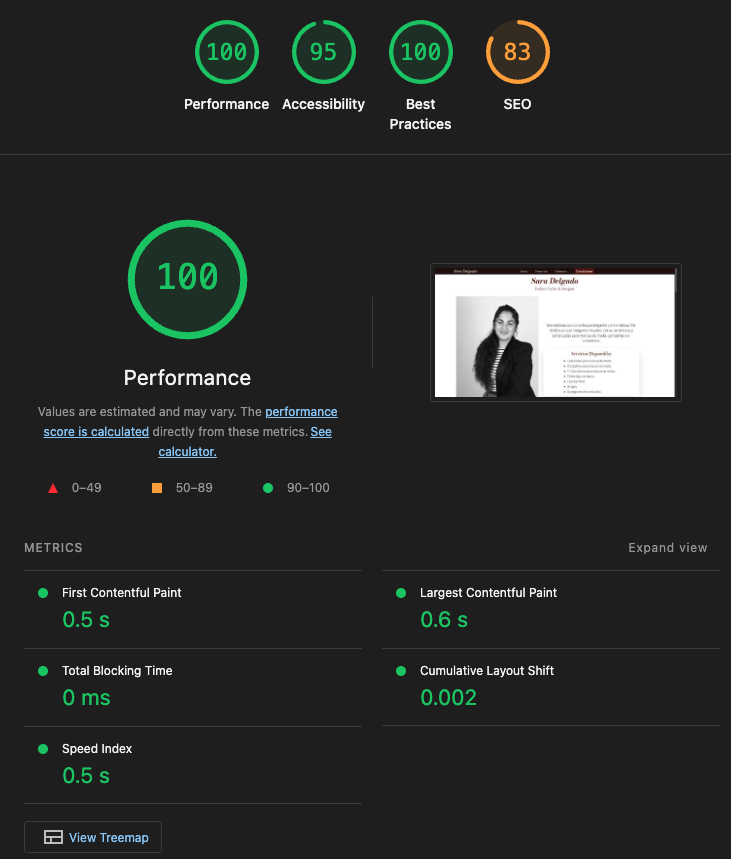
The site achieved excellent Lighthouse scores: 100 Performance, 95 Accessibility, 100 Best Practices, and 83 SEO (deductions due to pending content from the client).
Regarding analytics, we choose to work with cloudflare analytics and have seen 30 to 65 unique visitors a day, totalling 1.1k visitors a month with virtually 0 errors after the development phase.
Uptime
The site is on Cloudflare Pages, meaning the uptime is close to perfect. I have an Uptime Kuma instance running in my homelab and my recorded uptime is 99.9% from November 2025 to February 2026:
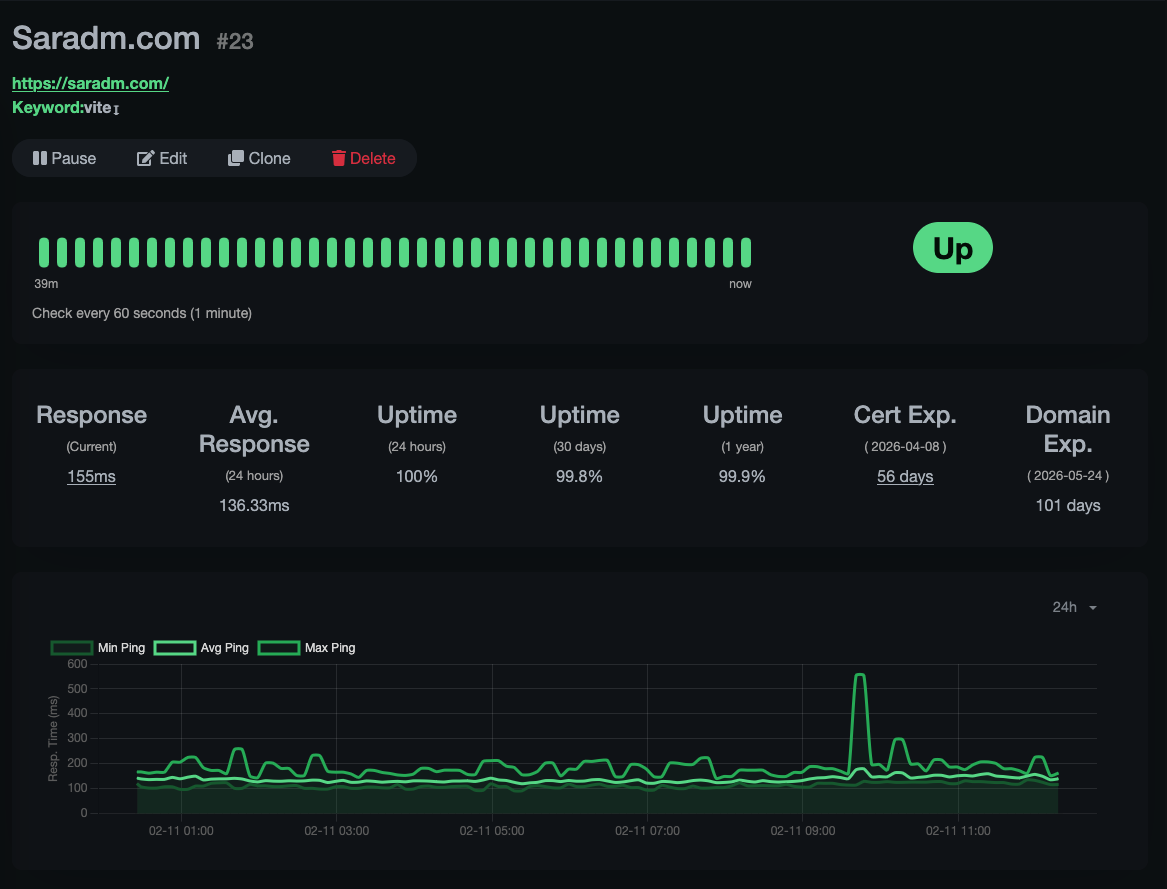 Note: 99.9% uptime reflects Cloudflare’s infrastructure reliability; my local monitoring has brief gaps due to home network maintenance windows.
This combination of high performance scores, reliable uptime, and real user traffic demonstrates a production-ready application serving actual business needs.
Final Thoughts
This project started when a Sara needed a portfolio site. I showed her my Hexo setup, but the markdown workflow was a non-starter; she needed something visual and clickable, not code-based. That sent me looking for a modern stack that could match Hexo’s speed and simplicity while giving her an actual CMS.
From my time doing WordPress/WooCommerce work at an agency in Spain (2019-2021), I knew the pain of optimizing image-heavy WordPress sites on shared VPS hosting. With my friend splitting time between continents, a global CDN wasn’t optional, it was a necessity.
Astro felt right immediately: open-source, extensible, and it didn’t fight me when I wanted to customize things. Sanity gave her the visual editing experience she needed. The webhook tied them together so content changes trigger rebuilds automatically. Cloudflare Pages’ generous free tier meant hosting costs are negligible while still providing enterprise-grade analytics and global edge delivery.
The result speaks for itself: a client who can manage her own content, a site that loads fast anywhere in the world, and an architecture that’s been running hands-off for months with 3 9s of uptime.